This Discord video compressor shrinks MP4, MOV, AVI, WebM or MKV files until they fit Discord’s upload limit: 20 MB on a free account, 50 MB with Nitro Basic or 500 MB with Nitro. Every finished file is checked to be under the limit you pick, and a video too long to fit stops with an error before any credits are used. Files up to 200 MB are free after sign-in.
Earlier compression demo; its settings were not recorded. The measured Discord video compressor results are further down this page.
Drag & drop your video here
or click to browse • MP4, QUICKTIME, X-MSVIDEO, WEBM, X-MATROSKA up to 1.00 GB
A Discord video compressor is a tool that makes a video small enough to upload to Discord by re-encoding it to a file size you choose rather than a quality level you choose. You pick the limit, 20 MB, 50 MB or 500 MB, and the compressor works out the bitrate, and if necessary the resolution, that lets the whole clip fit.
That is what separates a video compressor for Discord from a general one. A quality preset shrinks a file by an unpredictable amount, so a long clip can still come out too big to post. This Discord video compressor runs a two-pass H.264 encode aimed at your limit, checks the finished file and re-encodes once at a lower bitrate if it overshoots.
Use it when a clip is too big to post in a Discord chat and you want it to play inline. Skip it when the video is far too long for your limit: a ten-minute recording compressed for Discord’s 20 MB free limit comes out at 240p, and an unlisted YouTube link serves your server better.
A two-pass encode spreads the bit budget across the clip. In our tests the Discord video compressor landed at 96% of the target size, and any file that still overshoots is re-encoded once at a lower bitrate.
When the budget is too thin for the original frame size, the picture steps down to 1080p, 720p, 540p or lower with its aspect ratio kept. A two-minute 1080p clip became 960×540 at 20 MB and 1280×720 at 50 MB.
Output is an 8-bit H.264 MP4 with AAC audio and its index at the start of the file, a combination browsers and Discord’s player handle reliably. 60 fps clips are capped at 30 fps when bits are tight.
Compress files up to 200 MB for free after sign-in. Larger files up to 1 GB cost 1 credit per started minute of video, and nothing is charged when a clip cannot fit your chosen limit.
We ran real clips through the same two-pass function the service uses and scored each result against its source with VMAF (0 to 100; higher is closer to the original), scaling smaller outputs back to the source size first. The 60-second and two-minute files repeat one 16-second stock clip of a woman reading in a park, which has no audio track, so all of the budget went to video; its soft, out-of-focus background is easier to compress than grass, crowds or fast gameplay.
Source: VideoEnhancer test, September 2026, FFmpeg 7.1.1 with libvmaf.
Discord raised the free upload limit from 10 MB to 20 MB in its September 8, 2026 patch notes; Nitro Basic stays at 50 MB and Nitro at 500 MB. Discord can change these limits, so check its current terms if an upload is refused.
Source: Discord Patch Notes, September 8, 2026.
Drop in an MP4, MOV, AVI, WebM or MKV file up to 1 GB from your phone or computer.
Choose 20 MB for a free account, 50 MB for Nitro Basic or 500 MB for Nitro. Only limits smaller than your file can be selected.
The MP4 you download from the Discord compressor is under your limit and ready to drag into a chat. Downloads stay available for 3 days.
At 20 MB a 30 fps clip keeps full 1080p for about 30 seconds and 720p for about 1 minute 5 seconds. Our 60-second 1080p test clip compressed for Discord at 19.2 MB, stepped down to 720p, with a VMAF of 91.3.
Fifty megabytes keeps 1080p30 for about 1 minute 15 seconds and 720p for about 2 minutes 44 seconds; our two-minute test clip fit at 48.1 MB in 720p with a VMAF of 91.8.
Five hundred megabytes holds about 12 minutes of 1080p30 or 27 minutes of 720p, so most gameplay recordings fit without a large drop in resolution.
Discord’s upload limit is 20 MB per file on a free account, 50 MB with Nitro Basic and 500 MB with Nitro. The free limit rose from 10 MB to 20 MB on September 8, 2026, so a video compressor for Discord still set to 10 MB shrinks your clips far more than it needs to.
How much video fits depends on length much more than on the original file size. The table shows how long a clip can run before this Discord video compressor lowers the resolution, based on its own bitrate rules for 30 fps footage with stereo audio.
| Discord plan | Upload limit | Keeps 1080p30 up to | Keeps 720p30 up to | Longest clip accepted |
|---|---|---|---|---|
| Free | 20 MB | 30 s | 1 min 5 s | About 12 min, at 240p |
| Nitro Basic | 50 MB | 1 min 15 s | 2 min 44 s | About 30 min |
| Nitro | 500 MB | 12 min 32 s | 27 min 21 s | About 5 hours |
To get a video onto Discord, upload it to the Discord video compressor, choose the limit that matches your account and post the MP4 you download. It works from a phone or computer browser; the encoding itself runs on our servers.
Before you upload, trim anything the chat does not need to see. Every second you cut gives the rest of the clip more bitrate, which matters most at 20 MB, where a one-minute clip gets about 2.4 Mbps of video.
Whether 720p or 1080p looks better at 20 MB depends on the picture. On a detailed 60-second clip of sunlit grass, 720p scored VMAF 66.7 and a starved 1080p file 59.3; on the smoother park clip in the examples below, keeping 1080p would have scored 93.7 against 91.3 at 720p. The Discord compressor chooses from length and frame size alone, not from picture detail, so it leans towards the safer 720p.
These results come from running real clips through the Discord video compressor code the service uses. Sizes are megabytes of 1,000,000 bytes, the unit the targets are checked against, and every output came in at or under its target.
The 16-second clip kept full 1080p at 20 MB with a VMAF of 96.3, and scores stayed above 90 up to 60 seconds at 20 MB and two minutes at 50 MB. Squeezing two minutes into 20 MB forced 960×540 and a score of 86.1. The last row shows how much the picture matters: a clip of dense grass at the same 60-second, 20 MB budget scored only 66.7.
| Test clip | Target | Output | Resolution | VMAF |
|---|---|---|---|---|
| 16 s 1080p park clip, 50.2 MB | 20 MB | 19.2 MB | 1920×1080 | 96.3 |
| 60 s 1080p park clip, 188.2 MB | 20 MB | 19.2 MB | 1280×720 | 91.3 |
| 2 min 1080p park clip, 379.1 MB | 50 MB | 48.1 MB | 1280×720 | 91.8 |
| 2 min 1080p park clip, 379.1 MB | 20 MB | 19.3 MB | 960×540 | 86.1 |
| 60 s 1080p grass clip, 173.2 MB | 20 MB | 19.3 MB | 1280×720 | 66.7 |
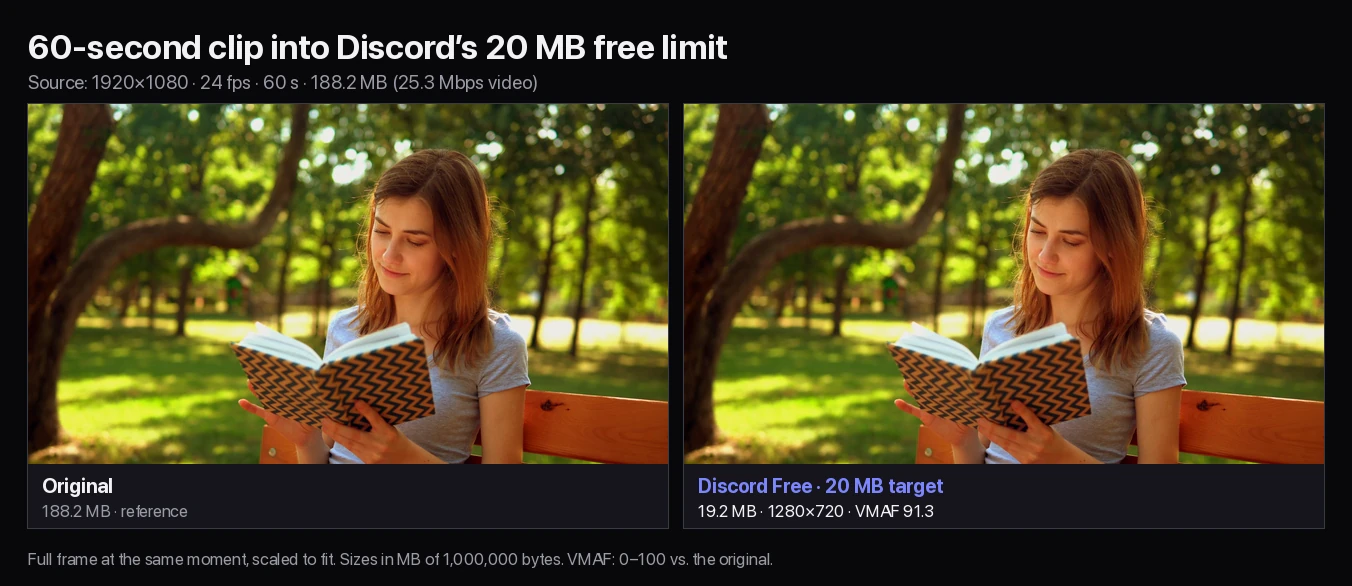
Compressed for Discord’s 20 MB free limit, this 188.2 MB, 60-second 1080p clip came out at 19.2 MB. At that budget the compressor stepped down to 1280×720 and scored VMAF 91.3.
In the full frame the woman, the book and the bench look the same as the original. Watched full screen, the finest backlit hair strands soften and the out-of-focus leaves show faint blotches. Kept at 1080p, this smooth clip would have scored 93.7, while a detailed grass clip did better at 720p.
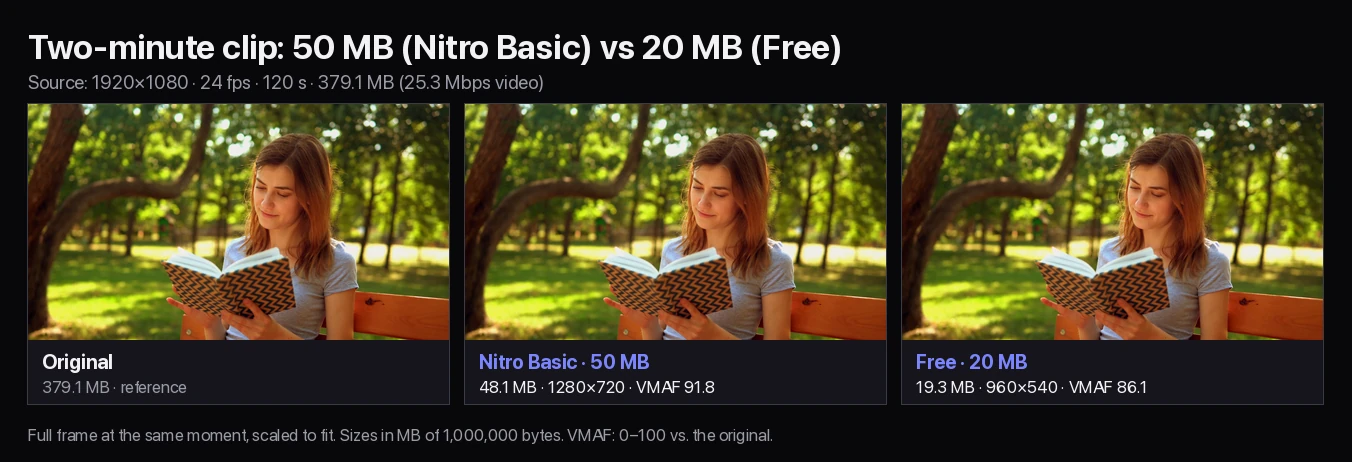
At 50 MB, the Nitro Basic limit, a two-minute version of the same clip fit at 48.1 MB in 1280×720 with a VMAF of 91.8, and in the full frame it looks the same as the original.
At 20 MB there was only about 1.28 Mbps of video for two minutes, so the compressor stepped down to 960×540 and scored 86.1. It looks clean in a chat player, but full screen the hair and the zigzag pattern on the book turn visibly softer. With a 128 kbps audio track the video would get about 10% less, and a detailed clip would lose much more, so for long clips on a free account, trim first or use Nitro Basic.
No Discord video compressor can beat the arithmetic: the limit divided by the length sets the bitrate. At 20 MB, a five-minute 1080p video gets about 450 kbps of video, which this compressor delivers at 360p, and a ten-minute video drops to 240p.
Past roughly 12 minutes at 20 MB, 30 minutes at 50 MB or 5 hours at 500 MB, the compressor refuses the job instead of producing an unwatchable file, and no credits are charged. At that point, trim the video, split it into parts, or upload it to YouTube as unlisted and paste the link into Discord.
If you prefer HandBrake or FFmpeg, work out the total bitrate as the limit in megabytes × 8,000 ÷ the length in seconds, then subtract the audio bitrate. For a 60-second clip and Discord’s 20 MB limit that is 20 × 8,000 ÷ 60 ≈ 2,667 kbps, minus 128 kbps of audio, leaving about 2,540 kbps for video.
Aim a few percent lower, because the MP4 container and rate control add a little. This Discord video compressor uses 96% of the limit, which is why its 20 MB results land at 19.2 to 19.3 MB. Use a two-pass encode so the bitrate is spent evenly across the clip.
A dedicated video compressor for Discord is the quickest way to post a clip that plays in the chat. The other options suit longer videos or people who share large files every day. Whichever video compressor Discord users pick, check that the output is an H.264 MP4 under the limit before posting.
| Option | Best for | Trade-off |
|---|---|---|
| This Discord video compressor | Posting a clip that plays inline, from any device, with no settings | Sign-in and upload required; very long videos lose resolution |
| Quality-preset video compressor | Shrinking files when an exact size does not matter | The output is not guaranteed to fit Discord |
| HandBrake or FFmpeg | Full control, batches, other codecs | You calculate bitrates yourself and check the codec plays in Discord |
| Nitro Basic or Nitro | Sharing longer, higher-quality clips often | Monthly subscription |
| Unlisted YouTube link | Long recordings and full matches | Viewers leave the chat to watch; not a file upload |
The Discord compressor is built for Discord’s three upload limits. Use a desktop encoder when you need anything in the right-hand column.
Guides and tools for limits, links and general compression.
Discord allows 20 MB per file on free accounts, 50 MB with Nitro Basic and 500 MB with Nitro. The free limit was raised from 10 MB to 20 MB in Discord’s September 8, 2026 patch notes, so guides that mention 8 MB, 10 MB or 25 MB are out of date.
Upload the video to this Discord video compressor, choose 20 MB, 50 MB or 500 MB to match your account, and download the MP4. It will be under the limit you chose and ready to drag into a Discord chat.
Yes. Every result is checked against the byte limit, and a file that overshoots is re-encoded once at a lower bitrate. If a video is too long to fit at a watchable quality, the job stops with an error before any credits are charged.
Files up to 200 MB are free after you sign in. Files from 200 MB to 1 GB cost 1 credit per started minute of video, so a 3 minute 20 second file costs 4 credits. There is no watermark.
Only when the budget is too small for the original frame size. In our tests a 16-second 1080p clip kept full resolution at 20 MB, a 60-second clip stepped down to 1280×720, and a two-minute clip became 1280×720 at 50 MB and 960×540 at 20 MB.
With this compressor’s settings, a 30 fps clip keeps full 1080p for about 30 seconds and 720p for about 1 minute 5 seconds at 20 MB. Longer clips are scaled down further, and anything past roughly 12 minutes is rejected.
The best video compressor for Discord targets the actual upload limit rather than a quality level, outputs a widely playable H.264 MP4 and checks the final size. This one does all three; HandBrake and FFmpeg can as well if you calculate the bitrate yourself.
Yes. This video file compressor for Discord runs in your phone’s browser: sign in, pick the video from your gallery and choose your limit. The encoding runs on our servers, and you download the finished MP4 to share in the Discord app.
A limit is disabled when your file is already smaller than it, because the video does not need compressing for that plan. If your file is under 20 MB, upload it to Discord as it is.
An MP4 with 8-bit H.264 video, AAC audio and the index at the start of the file. HDR and 10-bit sources are converted to 8-bit so they play in Discord and browsers, and 60 fps is capped at 30 fps when the budget is tight.