Reduce grain and improve detail in digitized family recordings, VHS and old phone videos. Choose 1080p, 2K or 4K. Video processing includes a 5-second free trial. Further processing requires payment.
Archival film restoration example. The same scene is shown before and after processing; results depend on the source footage.
Drag & drop your MP4 video here
or click to browse • MP4 up to 500.0 MB
Digitize your tape first, then export an MP4. Test a scene with faces and movement: AI can reduce grain and improve soft edges, but cannot repair a damaged tape or reconstruct missing moments.
Digitized archival film example, not a VHS capture. Compare texture and moving edges in the same scene.
AI video restoration is the process of rebuilding detail that a low-resolution or noisy recording no longer contains, using a model trained to predict what the missing texture most likely looked like. It is not the same as upscaling: a plain upscale stretches the pixels you already have, while video restoration synthesises new ones. This page runs FlashVSR, a video super-resolution model, on a digitized MP4 and returns a larger, cleaner file.
Use it on footage whose problem is softness, grain or low resolution — VHS and camcorder digitizations, old phone videos, clips that were compressed by a website years ago. Upload an MP4 up to 500 MB and 120 seconds, choose 1080p, 2K or 4K, and download the restored video.
Do not use it as a repair tool. Restoration cannot recover frames that were never captured, fix a physically damaged tape, colorize black-and-white footage, or undo a bad crop. It also invents texture rather than recovering the true one, so for legal, forensic or archival work where the pixels must be defensible evidence, restore nothing and keep the original capture.
1080p costs $0.03 per second, 2K $0.06 and 4K $0.10. A 5-second test at 1080p is 15 credits; the same clip at 4K is 50.
Upload an MP4 exported from a VHS, Hi8, MiniDV or camcorder capture, or any old clip that has gone soft. Restoration works on what the file still contains.
We degraded a 1080p clip to 360p, restored it, and compared both against the untouched original. The numbers and the frames are further down this page.
MP4 only, up to 500 MB and 120 seconds. Video restoration does not colorize, deinterlace, recover deleted files or repair damaged tape.
We took a licensed 1080p stock clip, degraded it to 640×360 at 400 kbps to stand in for an old web upload, and ran it through this page at 1080p and at 4K. Because the untouched 1080p original still exists, every figure below is measured against a real reference rather than eyeballed.
Source: VideoEnhancer test, 17 September 2026, FlashVSR via the production pipeline.
A single source cannot predict your tape. Grain, interlacing, camera motion and how many times a file has been re-compressed all change the result. Run the 5-second free trial on a scene with a face and movement before paying for a longer clip.
Upload a playable MP4 under 500 MB and 120 seconds.
Pick 1080p, 2K, or 4K based on the result you need.
The enhanced MP4 is available when the asynchronous task completes.
Improve clarity in digitized tape footage.
Prepare older family recordings for modern displays.
Upscale short archival MP4 exports.
This is the clearest way to show what AI video restoration actually does. We took a licensed 1080p stock clip, degraded it to 640×360 at 400 kbps — roughly what a video uploaded to a website fifteen years ago looks like today — and restored it back to 1080p. The 183 KB source came back as a 5.6 MB file in about two minutes, for 15 credits.
Because the untouched original still exists, the bottom row of the comparison shows something you almost never get to see: the restored frame and the real frame, side by side at 100%. The plain upscale in the left panel is what stretching pixels looks like. The restored frame has hair strands and eyebrow detail the 360p file simply did not contain — the model predicted them.
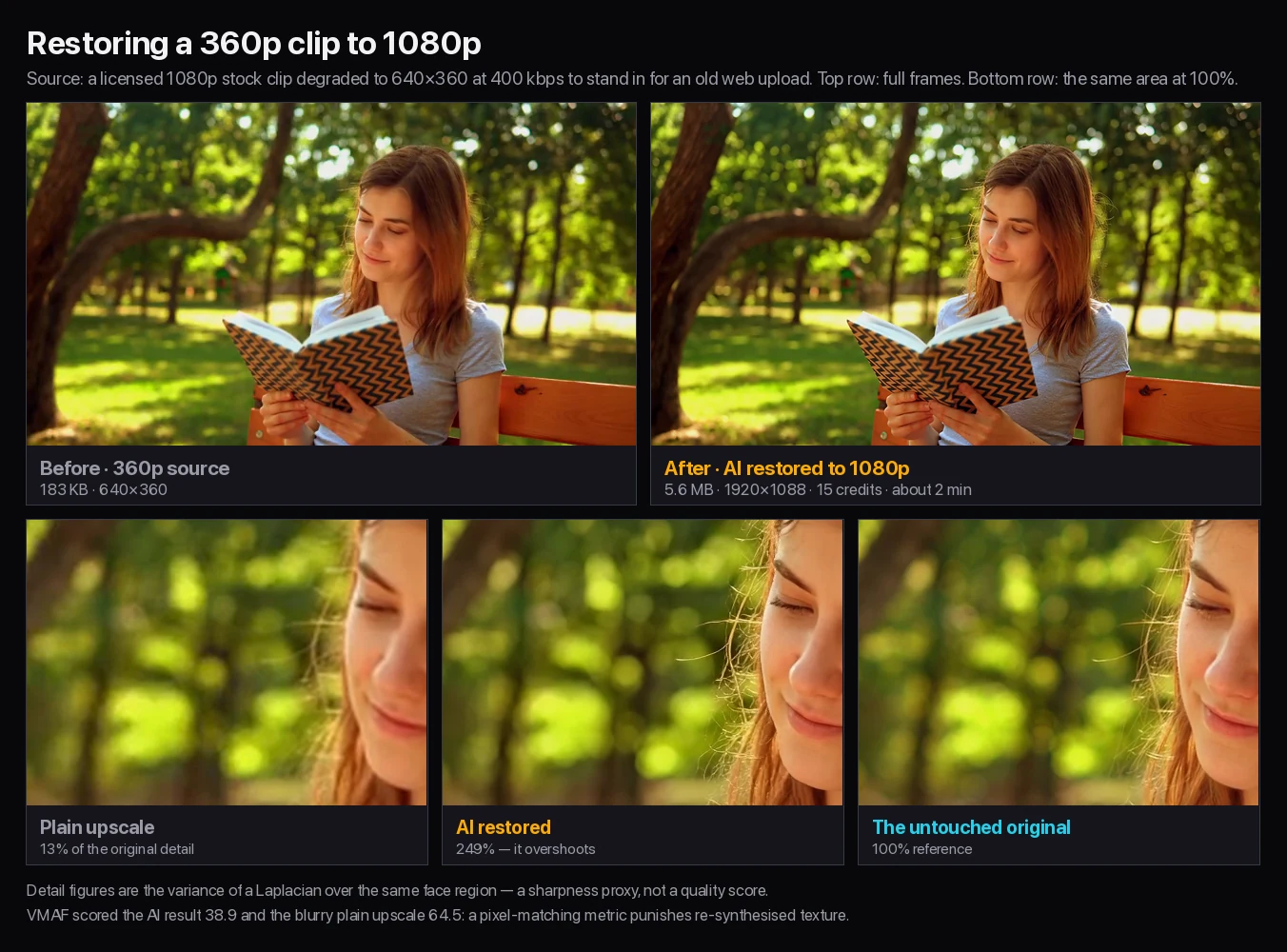
Our compression pages quote VMAF, Netflix’s perceptual quality metric, for every result. Restoration is the one job where that number lies, and it is worth explaining because almost every competitor quotes one anyway.
VMAF scored the restored clip 38.9 and the blurry plain upscale 64.5 — it preferred the version with less detail. That is not a bug. VMAF compares the output pixel by pixel against a reference, so an upscale that stays faithfully soft scores well, while a model that invents plausible new texture is penalised for every strand of hair that lands one pixel off. A metric built for compression punishes exactly what you are paying restoration to do.
So we measured detail instead. Over the same face region, the plain upscale retained 13% of the original’s fine-detail energy and the restored frame reached 249% — it goes past the real original rather than matching it. That is the honest description of this model: it does not recover your footage, it redraws it convincingly, and it slightly over-sharpens. If that trade is wrong for your material, no setting on this page fixes it.
| Version of the same frame | Fine detail vs the original | VMAF vs the original |
|---|---|---|
| The untouched 1080p original | 100% (reference) | — |
| Plain lanczos upscale from 360p | 13% | 64.5 |
| Restored to 1080p on this page | 249% | 38.9 |
A VHS restoration job starts on the deck, not here. Capture the tape at its native rate with a working VCR and a capture device, and keep that file untouched — every later step should work from a copy. Restoring a tape that was captured badly only makes the capture’s faults larger and sharper.
Check the capture for comb-like horizontal lines during movement. That is interlacing, and it is a separate problem from resolution: deinterlace it in an editor before you upload, because this page does not deinterlace and will happily sharpen the combing. Correct a heavy colour cast in the same pass, for the same reason.
Then restore a 5-second scene that has a face and some motion in it, not a static title card. Faces are where over-sharpening shows first, and motion is where a video super-resolution model either holds together or shimmers.
Start at 1080p, and be sceptical of 4K. We ran the same degraded 360p clip at both. The 4K output arrived at 3840×2160 and 18.3 MB — 3.3 times the file for 3.3 times the price, from exactly the same 640×360 of real information.
Viewed at 1080p, the 4K version measured 150% of the original’s fine detail against the 1080p version’s 249%: bigger, but not sharper for most viewing. Pay for 4K when the footage will be shown on a 4K screen or cropped into, not because the number is larger.
| Output | Price | 5-second test | From the same 360p source |
|---|---|---|---|
| 1080p | $0.03/s | 15 credits | 1920×1088, 5.6 MB, about 2 minutes |
| 2K | $0.06/s | 30 credits | Between the two; not separately measured |
| 4K | $0.10/s | 50 credits | 3840×2160, 18.3 MB, about 2 minutes |
Use this page when you have one or two short clips, no GPU worth speaking of, and no interest in installing anything. It runs in a browser, the 5-second trial costs nothing, and the model runs on our hardware.
Use desktop video restoration software when you have a whole tape library rather than a clip, when you need deinterlacing, colour work and restoration in one timeline, or when the footage cannot leave your machine. A per-second price stops making sense somewhere around the first hour of material, and no browser tool will match an editor for frame-level control.
Video processing includes a 5-second free trial. Further processing requires payment.
Paid video restoration accepts MP4 files up to 500 MB and 120 seconds. Output is priced per second of video: $0.03 for 1080p, $0.06 for 2K and $0.10 for 4K, so a 30-second restoration at 1080p costs $0.90 and the same clip at 4K costs $3.00. Both of our test runs finished in about two minutes; a 120-second clip takes proportionally longer.
Continue from Video Restoration with a workflow matched to your source file and delivery goal.
Video processing includes a 5-second free trial. Further processing requires payment. The trial is the right way to judge AI video restoration: run it on a 5-second scene with a face and motion, then decide whether the longer clip is worth paying for.
It can improve a VHS digitization that is soft, grainy or low-resolution, but only after you capture the tape and deinterlace it. This page does not deinterlace, so comb-like lines during movement will be sharpened rather than removed. Physical tape damage, dropouts and missing frames stay missing.
It adds detail that was not in the file, by predicting it. In our test the restored frame reached 249% of the untouched original’s fine-detail energy while a plain upscale reached 13%, so it goes beyond the real footage rather than matching it. The texture is convincing but invented, which is why we do not recommend it for forensic or legal work.
Start with 1080p. We ran the same 360p source at both: 4K came back at 3840×2160 and 18.3 MB versus 1920×1088 and 5.6 MB, for 3.3 times the price, from identical source information. Choose 4K when the result will be shown on a 4K screen or cropped into.
Because the standard metric gets restoration backwards. VMAF scored our restored clip 38.9 and a blurry plain upscale 64.5, since it compares pixels against a reference and penalises invented texture. We publish a fine-detail measurement and the frames themselves instead.
MP4 only, up to 500 MB and 120 seconds. Both test runs, a 5-second clip at 1080p and at 4K, completed in about two minutes.
No. FlashVSR performs video super-resolution and noise reduction. It does not colorize black-and-white footage, rebuild frames that were never captured, or recover deleted or corrupted files.
For one or two short clips, online is faster and cheaper to try. For a tape library, for deinterlacing and colour work in the same timeline, or for footage that cannot leave your machine, desktop restoration software is the right tool.
FlashVSR, a video super-resolution model, run on our servers. You upload an MP4 and download an MP4; nothing is installed.