A video compressor that lets you compress video online: it re-encodes MP4, MOV, AVI, WebM or MKV files to H.264 MP4 at the original resolution and frame rate to reduce video file size for email, messaging or upload. Choose High, Medium or Low video compression. Files up to 200 MB are free after sign-in; larger files up to 1 GB cost 1 credit per started minute.
Earlier demonstration clip: 2.9 MB before and 1.8 MB after. Its settings were not recorded; the measured examples further down use the current presets.
Drag & drop your video here
or click to browse • MP4, QUICKTIME, X-MSVIDEO, WEBM, X-MATROSKA up to 1.00 GB
A video compressor is a tool that makes a video file smaller by re-encoding it at a lower bitrate while keeping the picture as close to the original as the chosen setting allows. This video compressor works online: upload a file, pick a preset and download the compressed video as an H.264 MP4 with the same resolution, frame rate and aspect ratio, with AAC audio at 128 kbps.
Video compression always trades some quality for size. The encoder discards detail it predicts you will not notice, and lower presets discard more. How much a file shrinks depends mostly on how wasteful the original was: high-bitrate camera files and screen recordings shrink a lot, while a video already compressed for the web has little left to remove.
Use it to compress video that is too big to attach, send or upload when an MP4 is fine. Skip it when you need an exact target size, when you must keep HDR or 10-bit colour for editing, or when the video is already small: in our test a 918 kbps 720p clip shrank only 23% at High while its VMAF score dropped to 89.2.
High uses CRF 23, Medium CRF 28 and Low CRF 33 with the libx264 encoder. A lower CRF keeps more detail and makes a larger compressed video; as a rule of thumb, raising CRF by about 6 roughly halves the bitrate.
The video compressor does not downscale, crop or change the frame rate. Only the bitrate changes, and audio is re-encoded to AAC at 128 kbps.
Upload MP4, MOV, AVI, WebM or MKV up to 1 GB. Every compressed video is an H.264 MP4, a format nearly every phone, browser and editor can play.
Sign in and compress video files of 200 MB or less at no cost. Larger files cost 1 credit per started minute of video, so a 4 minute 30 second file costs 5 credits. Results have no watermark.
We ran four clips through the exact command this video compressor uses (libx264, CRF 23/28/33, preset veryfast, AAC 128 kbps) and scored each output against its source with VMAF, Netflix’s open-source perceptual quality metric (0 to 100; higher is closer to the source). The live service runs a slightly newer FFmpeg 7.1 build, so sizes can differ a little.
Source: VideoEnhancer test, September 2026, FFmpeg 7.1.1 with libvmaf.
Size savings and quality scores depend on resolution, motion, noise and above all the source bitrate. Use the results to pick a starting preset, then play your own download before sharing it.
Drag in an MP4, MOV, AVI, WebM or MKV file up to 1 GB. Files up to 200 MB are free.
Medium is selected by default. Pick High to keep more detail or Low for the smallest file. Files above 200 MB show their credit cost before processing.
The result shows the original size and the compressed video size. Play the MP4 before you send it; downloads stay available for 3 days.
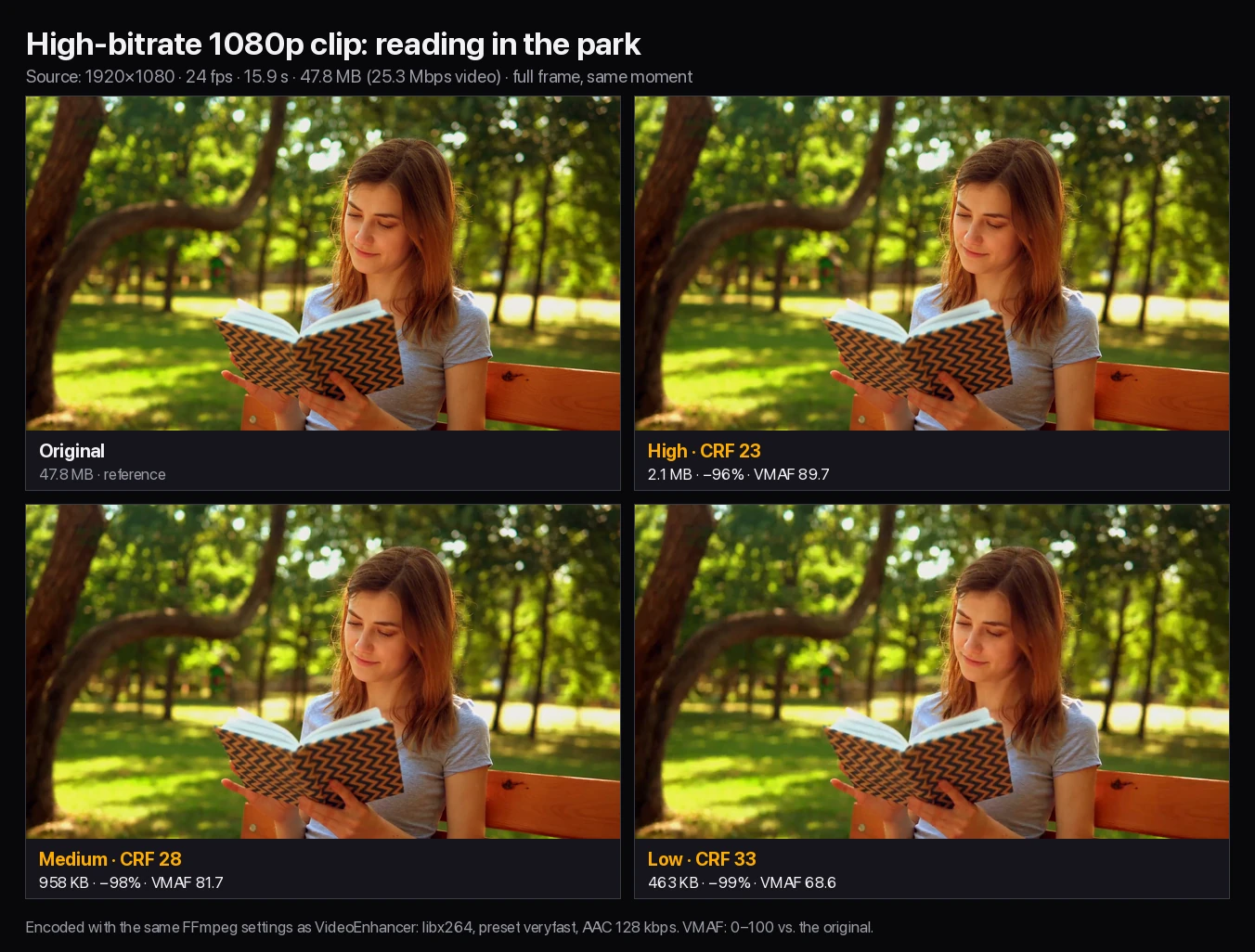
Personal Gmail accounts allow 25 MB of attachments per email. Our 16-second 1080p test clip was 47.8 MB, almost twice that; the video compressor brought it to 2.1 MB at High, so the compressed video fits with plenty of room to spare.
Apps and platforms re-encode uploads anyway, so sending a compressed video at High or Medium saves upload time and data without adding much visible loss.
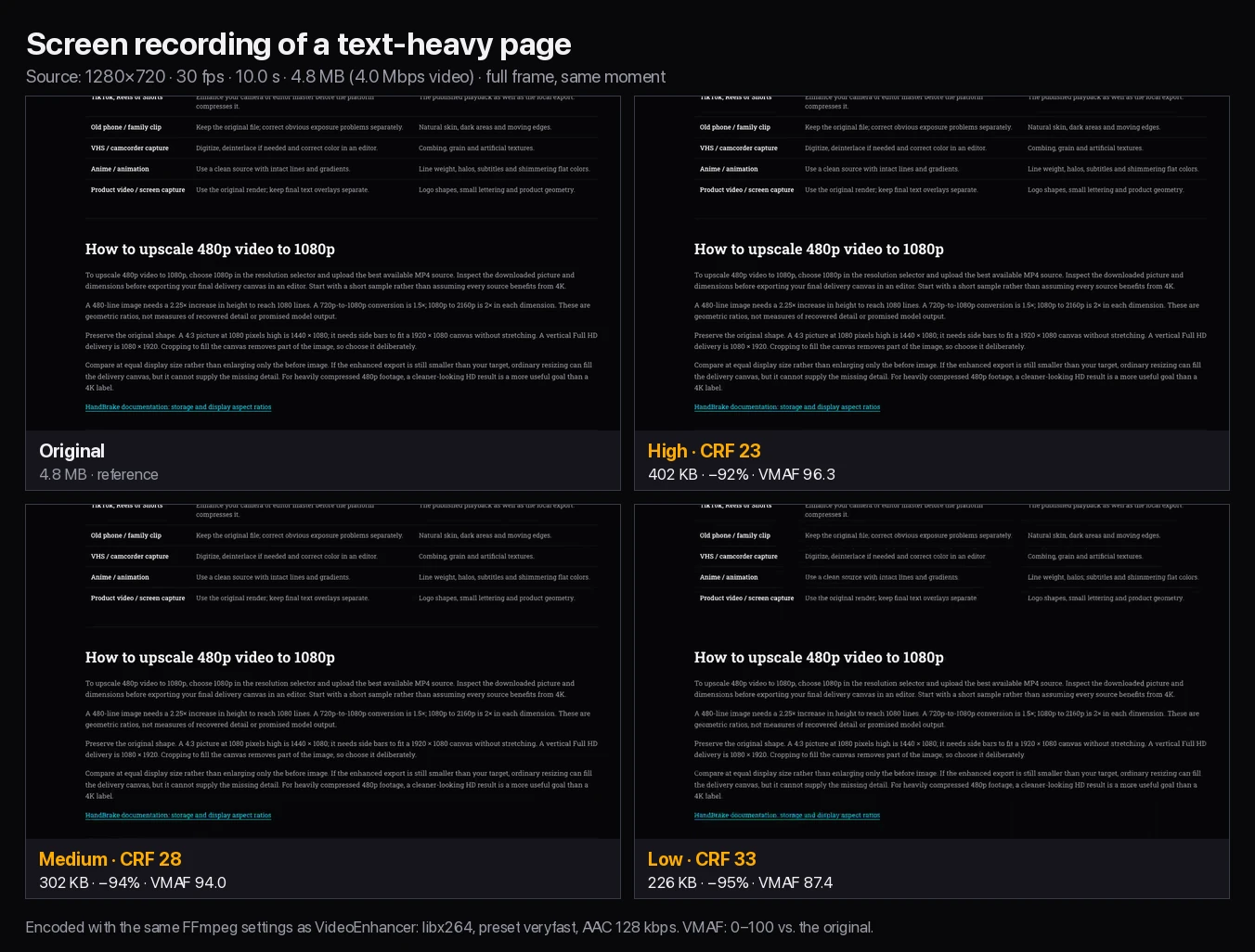
Screen captures are mostly static, so video compression works extremely well on them: our 4.8 MB test recording fell to 402 KB at High with a VMAF of 96.3.
Choose High for camera and AI-generated footage you care about, and Medium for screen recordings or when the file must be much smaller. In our tests High (CRF 23) cut high-bitrate files by 60–96% with VMAF scores from 89.7 to 96.3. Medium (CRF 28) removed 66–98%, but scores fell to 80–82 on camera, AI-generated and 720p footage. Low (CRF 33) made the smallest files, and its VMAF dropped to between 65 and 69 on those same three clips.
What is in the video matters as much as the preset. Screen recordings and plain backgrounds hide compression well; hair, foliage, water, film grain and generated texture show it first.
| Preset | Encoder setting | Good for | Watch for |
|---|---|---|---|
| High | libx264 CRF 23 | Keeping quality, archives, footage you will edit again | Small savings on already-compressed files |
| Medium | libx264 CRF 28 | Screen recordings, email, messaging | Softer hair, grain and fine texture |
| Low | libx264 CRF 33 | Getting under a strict size limit | Blocking, smeared detail, banding in dark areas |
These are the results of running the video compressor on four clips of 9 to 16 seconds with the FFmpeg settings it uses in production. Size is the complete MP4, including audio when the source has it. VMAF compares every frame of the output with the source; higher is closer to the original.
| Clip | Original | High (CRF 23) | Medium (CRF 28) | Low (CRF 33) |
|---|---|---|---|---|
| Park 1080p, 25.3 Mbps | 47.8 MB | 2.1 MB · −96% · VMAF 89.7 | 958 KB · −98% · VMAF 81.7 | 463 KB · −99% · VMAF 68.6 |
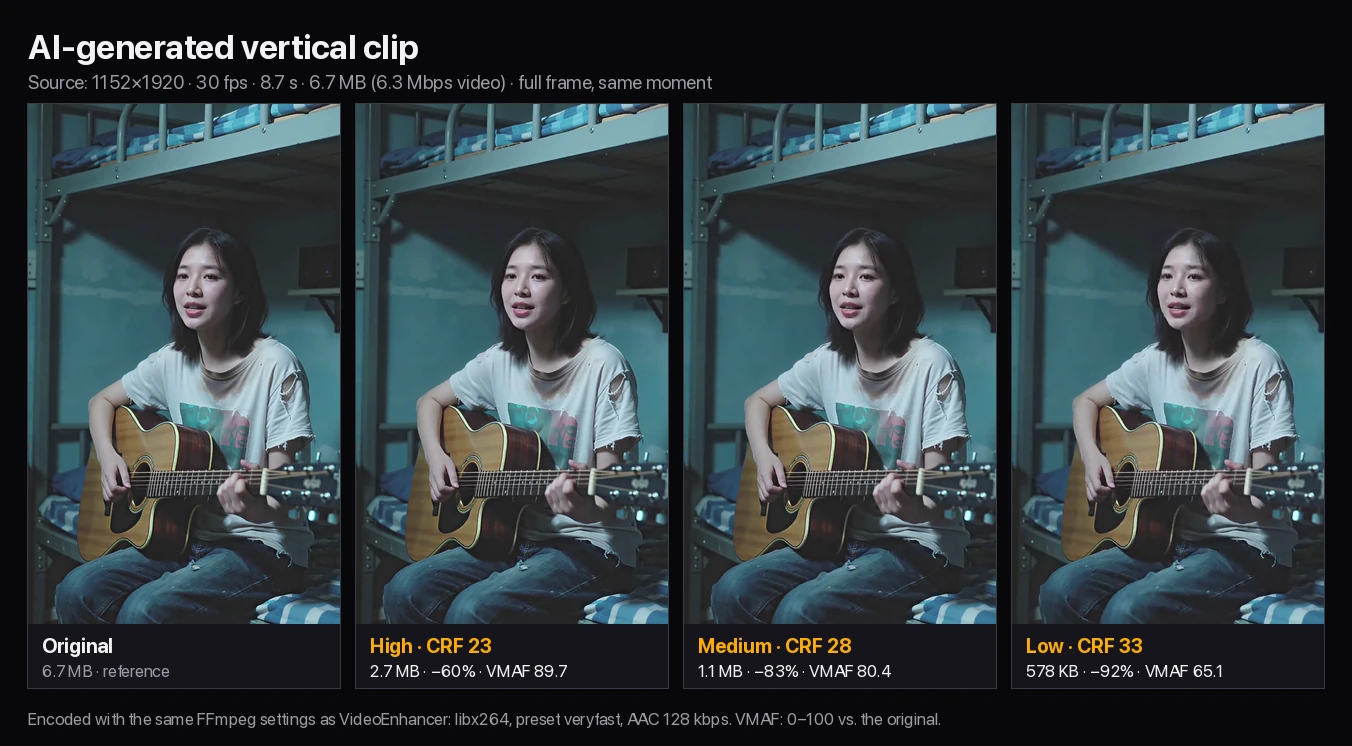
| AI clip, 6.3 Mbps | 6.7 MB | 2.7 MB · −60% · VMAF 89.7 | 1.1 MB · −83% · VMAF 80.4 | 578 KB · −92% · VMAF 65.1 |
| Screen, 4.0 Mbps | 4.8 MB | 402 KB · −92% · VMAF 96.3 | 302 KB · −94% · VMAF 94.0 | 226 KB · −95% · VMAF 87.4 |
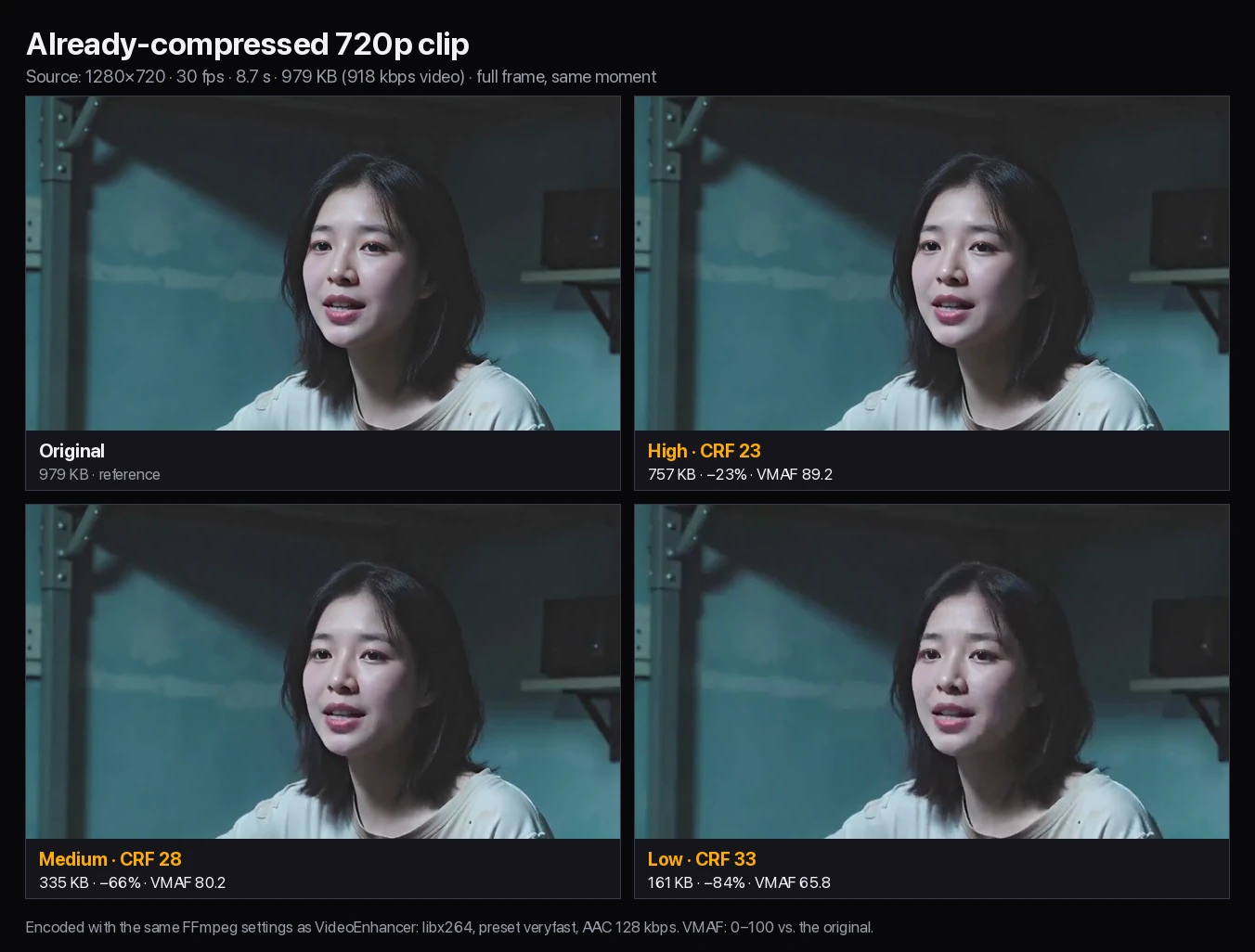
| 720p, 918 kbps | 979 KB | 757 KB · −23% · VMAF 89.2 | 335 KB · −66% · VMAF 80.2 | 161 KB · −84% · VMAF 65.8 |
High cut this 16-second, 25.3 Mbps 1080p stock clip of a woman reading in a park from 47.8 MB to 2.1 MB, 96% smaller, with a VMAF of 89.7; in the full frame it is hard to tell apart from the original. The camera file carried far more bitrate than the picture needs, which is why High could reduce video file size so much here but only 60% on a textured AI-generated clip.
Medium reached 958 KB (VMAF 81.7) and Low 463 KB (VMAF 68.6). Both still look close at full-frame size, but at 100% zoom Medium loses the fine backlit hair strands and freckles, and Low smooths skin and hair into flat patches, so keep Low for strict size limits.
Generated video often carries dense, noisy texture, which leaves video compression less to discard. High saved 60% on this 6.3 Mbps clip and scored 89.7, the lowest High score in the test.
Medium and Low shrank it to 1.1 MB and 578 KB. In the full frame Medium stays close to the original, while Low looks noticeably softer in the guitar, fabric and hair. Keep AI-generated footage at High if you still plan to upscale or edit it.
Screen recorders produce large files because they encode in real time at a high bitrate. This 4.8 MB, 10-second capture of a scrolling web page dropped to 402 KB at High (VMAF 96.3) and 302 KB at Medium (VMAF 94.0), with the small body text still readable in the full frame.
Low saved only 76 KB more than Medium and made the small text visibly fuzzier. When you compress video tutorials or bug reports, Medium is usually the best balance.
A file that was already compressed for the web has little redundancy left. This 918 kbps 720p clip shrank only 23% at High, from 979 KB to 757 KB, yet its VMAF fell to 89.2, because the encoder re-compresses artifacts that are already there.
Medium and Low reach much smaller files by throwing away real detail: at Low, blocky patches appear in the hair and on the wall even at full-frame size (VMAF 65.8). If a downloaded or previously shared video is already small, send the original, or accept a clear drop in quality.
Check the destination’s limit, compress at High, and drop to Medium or Low only if the file still does not fit. Personal Gmail accounts allow 25 MB of attachments per email, and Gmail swaps anything larger for a Google Drive link.
This video compressor does not take an exact target size, because its presets control quality rather than size. For an upload limit such as Discord’s, use the Discord compressor, which aims at 20 MB, 50 MB or 500 MB.
If High still leaves the file far above the limit, the video is too long for that channel: trim it, split it or share a link instead of pushing Low compression onto the whole clip.
Choose a desktop encoder such as HandBrake or FFmpeg when you need any of the controls in the right-hand column.
An online video compressor is the quickest way to compress video when you have one or two files on a computer or phone and do not want to install anything. Desktop tools are better when you compress often, need an exact size or want H.265.
| Option | Best for | Trade-off |
|---|---|---|
| This video compressor | Quick H.264 MP4 compression in a browser, free up to 200 MB | Three presets only; upload and sign-in required; 1 GB limit |
| HandBrake | Batch jobs, H.265, average-bitrate targets and device presets | Free, but needs installing and learning its settings |
| FFmpeg | Full control and scripting with the same libx264 encoder used here | Command-line knowledge required |
| Discord compressor | Fitting a 20 MB, 50 MB or 500 MB upload limit | Quality follows the target size |
Pick a guide or tool for your destination.
Yes, for files up to 200 MB: sign in and compress video files at no cost, with no watermark. Files from 200 MB to 1 GB cost 1 credit per started minute of video, so a 4 minute 30 second file costs 5 credits, and the cost is shown before processing.
Not completely, because every video compression preset is lossy. At High (CRF 23), our screen-recording test shrank 92% with a VMAF of 96.3, very close to the original, and a 1080p camera clip shrank 96% with a VMAF of 89.7 while looking the same at full-frame size. Already-compressed or highly detailed footage loses more, so check your download before sharing.
Medium is the default and suits screen recordings and quick sharing. Choose High for camera or AI-generated footage where detail matters, and Low only when fitting a strict size limit matters more than quality: in our tests Low dropped VMAF to between 65 and 69 on the camera, AI-generated and 720p clips.
It depends mainly on the source bitrate and how detailed the picture is. At High, a 25.3 Mbps 1080p camera clip shrank 96%, a 4.0 Mbps screen recording 92% and a 6.3 Mbps AI-generated clip 60%, but a 918 kbps 720p clip only 23%. High-bitrate camera files and screen recordings shrink the most; dense generated texture and files that were already compressed hold savings back.
Not on this page, because the presets control quality rather than size. Use the Discord video compressor for 20 MB, 50 MB or 500 MB targets, or HandBrake for a custom average bitrate. Otherwise compress at High and step down until the file fits.
Resolution, aspect ratio and frame rate stay the same. The output is always an H.264 MP4 with AAC audio at 128 kbps, so MOV, AVI, WebM and MKV uploads come back as MP4.
The original was probably already compressed efficiently, for example a video downloaded from a website or a messaging app. Re-encoding it can save little and still cost quality: in our test a 918 kbps clip shrank just 23% at High. Keep the original, or accept the quality of Medium or Low.
No. It uses H.264, which plays on nearly every phone, browser and editor. H.265 can make files smaller at similar quality but is less widely supported; use HandBrake or FFmpeg if you need it.
You can, but check the result. In our test a 10-bit HLG file came out as 10-bit H.264, which many browsers and phones cannot play. For sharing, convert HDR footage to SDR in your editor first, then compress it.
Yes, you need to sign in to upload. Compressed files stay available to download for 3 days, so save the result once it is ready.